Black Friday deals are live on Amazon · limited-time discounts, grab them before they’re gone
Grab the deals

ByMax Lee
How to Turn Off Car Wash Mode Tesla: Quick & Easy Guide
To turn off Tesla Car Wash Mode, open the vehicle’s touchscreen and select Controls > Service > Car Wash Mode, then tap Exit Car Wash Mode or switch the mode off. The exact wording can vary by Tesla model and software version.
Car Wash Mode is designed to prepare your Tesla for an automatic wash. It can close the windows, lock the charge port, disable the windshield wipers, and prevent several features from activating while water and brushes move around the vehicle. After washing, exit the mode before driving normally. For more on this, see our guide on oklahoma antique car registration guide for 25 year.
How to Turn Off Car Wash Mode on a Tesla
Use the center touchscreen while the vehicle is safely stopped.
- Sit in the driver’s seat and press the brake if your Tesla requires it.
- Tap Controls on the touchscreen.
- Select Service.
- Tap Car Wash Mode.
- Select Exit Car Wash Mode or tap the active toggle to switch it off.
- Confirm that the Car Wash Mode panel no longer shows the mode as active.
If your screen displays a dedicated Exit Car Wash Mode button, use that button rather than looking for a separate toggle.
Quick menu path
| Step | Touchscreen location |
|---|---|
| 1 | Controls |
| 2 | Service |
| 3 | Car Wash Mode |
| 4 | Exit Car Wash Mode or switch the mode off |
| 5 | Confirm normal vehicle operation |
Tesla’s menus can change with software updates, and the layout may differ between Model 3, Model Y, Model S, and Model X. For model-specific instructions, compare the on-screen menu with the relevant Tesla owner information. For more on this, see our guide on ny antique car registration guide for 25 year.
What Car Wash Mode Does
Car Wash Mode temporarily changes several vehicle settings to reduce the chance of water, brushes, or conveyor equipment interfering with the car. Depending on the Tesla model and software version, it may:
- Close the windows
- Disable the windshield wipers
- Lock the charge port
- Turn off Sentry Mode
- Disable walk-away door locking
- Mute parking sensor chimes
- Stop the charging-port door from opening
- Keep certain doors and controls from responding as they normally would
- Keep the vehicle prepared for a conveyor-style wash
The available settings are not identical on every Tesla. Think of Car Wash Mode as a temporary wash profile, not a mechanical lockout or a permanent vehicle setting.
In practice, the most common mistake is assuming that turning the mode on is enough. After the wash, check the screen and deliberately exit the mode before leaving the wash bay. For more on this, see our guide on how to update your nj address with the.
When to Use Car Wash Mode
Use Car Wash Mode immediately before entering an automatic or conveyor car wash, especially when the vehicle needs to remain in Neutral or when equipment may pass close to the windows, wipers, wheels, and charge port.
It is useful when you need to:
- Prevent automatic wiper activation
- Keep the windows closed
- Prevent the charge port from opening
- Reduce unexpected locking or alarm behavior
- Keep the vehicle configured for a conveyor wash
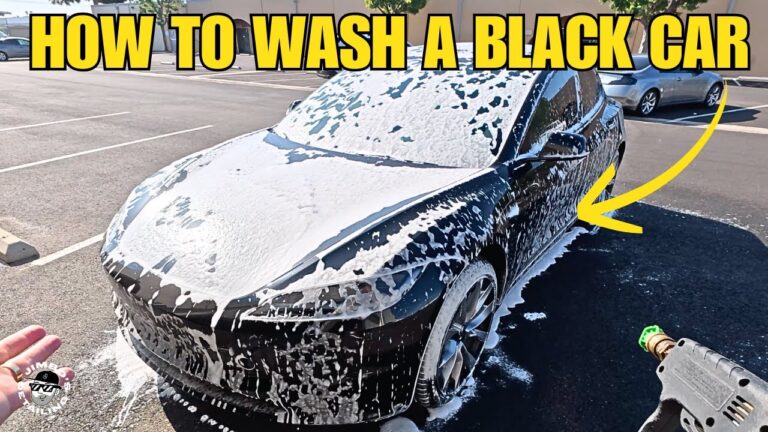
For hand washing, Car Wash Mode is usually unnecessary unless you specifically want to disable the wipers and other automatic features. If you wash by hand, a careful paint-safe washing routine can help reduce dirt-related scratching.
How to Exit Car Wash Mode After an Automatic Wash
Follow this sequence before driving away:
- Make sure the wash equipment has cleared the vehicle.
- Keep your foot on the brake and confirm that the vehicle is safely stopped.
- Open Controls > Service > Car Wash Mode.
- Tap Exit Car Wash Mode.
- Check that the windows, wipers, charge port, and normal locking behavior are available again.
- Select the required gear and leave the wash area slowly.
Do not depend on the vehicle exiting the mode automatically. Some Teslas may leave Car Wash Mode after a driving action or when the vehicle reaches a certain condition, but the exact behavior depends on the model and current software. Manually selecting Exit is the most reliable approach.
Can You Turn Off Car Wash Mode From the Tesla App?
Usually, no. The Tesla mobile app provides many remote controls, but Car Wash Mode is primarily managed from the vehicle’s touchscreen. The app may not display a Car Wash Mode switch, and app features can vary by vehicle, region, and software release.
If you are outside the car, unlock it or return to the driver’s seat and use the touchscreen. Do not assume that a missing control in the app means the car is malfunctioning.
What to Check After Turning It Off
Once the mode is off, perform a quick operational check:
- Windows: Confirm they respond to the window switches.
- Wipers: Test them only when the windshield is wet or after the wash has finished.
- Charge port: Confirm it opens normally if you need to charge.
- Doors: Check that the exterior and interior handles operate normally.
- Mirrors and locks: Verify that normal locking and mirror-folding behavior has returned.
- Gear selection: Confirm that the vehicle can shift normally.
- Parking sensors: Watch for normal alerts when maneuvering.
Dry the cameras, sensors, mirrors, and glass before driving. Water droplets or soap residue can temporarily reduce visibility or affect driver-assistance warnings. If you are preparing for a longer trip, also check tire pressure and keep the correct equipment available; a suitable air-compressor setup can be useful for maintaining tires at home.
Car Wash Safety Tips for Tesla Owners
Prefer a touchless wash when possible
A touchless wash avoids direct contact between rotating brushes and the paint. If you use a conveyor or automatic wash, follow the instructions shown in the vehicle and at the wash entrance.
Never force a stuck charge connector
If a charging cable is connected, stop charging and unlock the connector before entering a wash. Never pull hard on the cable or allow wash equipment to contact it.
Use Neutral only as instructed
Conveyor washes may require Neutral, but the correct procedure differs by Tesla model and wash equipment. Read the car wash’s instructions and keep your foot on the brake while setting the vehicle up.
Avoid opening doors in the wash bay
Wait until the vehicle has completely cleared the brushes, spray arms, conveyor, and exit gate. A door opened at the wrong time can contact equipment or allow water into the cabin.
Check the underbody after rough roads or wash equipment
If the vehicle has recently encountered debris, a steep ramp, or a poorly aligned conveyor, inspect the lower bumper and underbody after leaving. This is separate from Car Wash Mode, but it is a sensible part of post-wash vehicle care.
Do not treat Car Wash Mode as a driving mode
Car Wash Mode is temporary protection for cleaning. It is not intended for normal road driving. Exit it before continuing your trip, then verify the vehicle’s essential controls.
What If Car Wash Mode Will Not Turn Off?
Try these steps in order:
- Stop the vehicle completely.
- Confirm that no charging cable is connected.
- Close the Car Wash Mode panel and reopen it through Controls > Service.
- Check whether the touchscreen is responding to other controls.
- Shift into Park and try the exit command again.
- If the touchscreen is frozen, perform the standard Tesla touchscreen restart procedure for your model while parked safely.
- Wait for the display to reboot, then check the Car Wash Mode panel again.
- Contact Tesla Support if the mode remains active or another vehicle function is affected.
Do not restart the touchscreen while driving. A screen reboot can temporarily remove access to the display, even though the vehicle’s primary driving controls remain separate.
If the issue involves doors, steering, braking, charging, or another safety-critical system, do not continue driving just because Car Wash Mode has disappeared. Park safely and request Tesla roadside or service assistance.
Why You May Not See the Same Menu
Menu names and locations can differ because of:
- Tesla model and model year
- Vehicle software version
- Regional software configuration
- Whether the vehicle is in Park
- Whether the vehicle is connected to a charger
- A temporary touchscreen or connectivity issue
The correct menu may say Car Wash Mode, Exit Car Wash Mode, or show the setting inside the Service menu without a conventional toggle. Searching the vehicle’s touchscreen manual for “car wash” is often faster than guessing at the menu location.
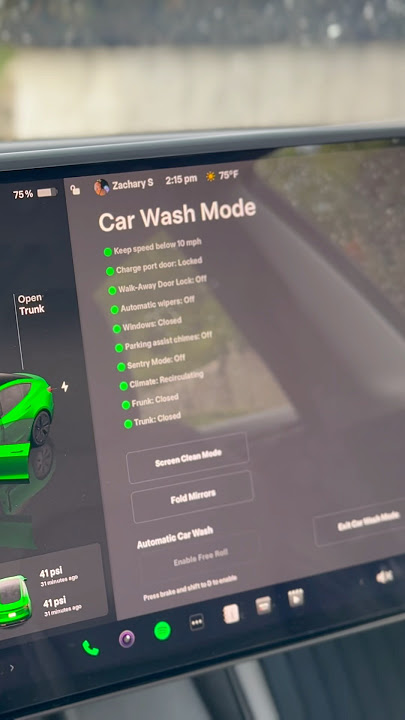
The touchscreen menu is where Tesla drivers normally exit Car Wash Mode.
Credit: www.youtube.com
Common Mistakes to Avoid
Assuming the Tesla app always has the setting
The app may not offer Car Wash Mode controls. Use the vehicle touchscreen instead.
Leaving the vehicle in the mode after washing
Car Wash Mode can leave wipers, locking behavior, and other features configured for the wash. Exit it before returning to normal driving.
Testing the wipers on a dry windshield
After washing, use washer fluid or a wet windshield before testing the wipers. Running wipers over dry grit can mark the glass.
Driving away before checking the charge port
Confirm that the port is closed and no cable or wash equipment remains near the vehicle.
Using an automatic wash without checking its instructions
Some washes require Neutral, while others use different conveyor procedures. Follow both the Tesla screen and the wash operator’s directions.
Frequently Asked Questions
How do I disable Car Wash Mode on a Tesla?
On the vehicle touchscreen, open Controls > Service > Car Wash Mode, then tap Exit Car Wash Mode or switch the active setting off. Keep the Tesla stopped while doing this.
Does Car Wash Mode turn off automatically?
It may exit automatically under certain vehicle conditions, but this can vary by model and software version. For a dependable result, manually select Exit Car Wash Mode after the wash.
Can I turn off Car Wash Mode remotely?
The Tesla app does not consistently provide a Car Wash Mode control. In most cases, you must use the vehicle’s touchscreen.
What happens if I forget to turn it off?
The Tesla may continue using wash-related settings, such as disabled wipers or altered locking behavior. The vehicle may still respond to some driving commands, but you should exit the mode before normal road travel.
How can I tell whether Car Wash Mode is active?
Open Controls > Service > Car Wash Mode. The panel should identify whether the mode is active and provide an exit option. Some vehicle software versions also show a status indicator on the touchscreen.
Can I use Car Wash Mode for hand washing?
Yes, but it is not essential for every hand wash. It can be helpful for keeping the wipers and other automatic features from activating, especially when water is flowing over the windshield.
Is Car Wash Mode available on every Tesla?
Tesla has offered Car Wash Mode across multiple models, but the feature’s availability, menu location, and included settings can vary. If you cannot find it, check the vehicle’s touchscreen manual and install available software updates when convenient.
Final Checklist
Before leaving the wash area, confirm:
- Car Wash Mode shows as inactive
- Windows operate normally
- Wipers are available
- The charge port is closed
- No cable or wash equipment is attached
- Doors and mirrors behave normally
- Cameras and sensors are clean
- The vehicle is in the correct gear
The quickest reliable method is Controls > Service > Car Wash Mode > Exit Car Wash Mode. If the option is missing or the touchscreen does not respond, keep the Tesla safely parked, restart the display only when appropriate, and contact Tesla Support if normal vehicle functions remain affected.