Black Friday deals are live on Amazon · limited-time discounts, grab them before they’re gone
Grab the deals

ByMax Lee
Mercedes-Benz MBUX: Creating a Car Wash Shortcut for Effortless One-Tap Prep
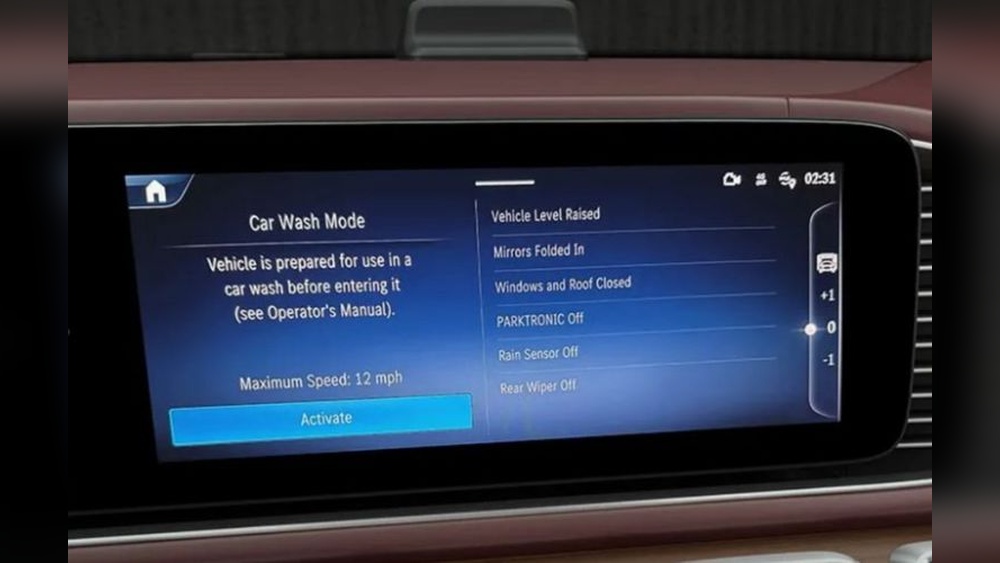
A car wash is simple until you remember everything that must be checked first: wipers, windows, mirrors, doors, the transmission selector and driver-assistance systems. Mercedes-Benz MBUX can make this preparation easier, but there is an important limitation: not every Mercedes-Benz vehicle has a built-in “Car Wash Mode,” and MBUX cannot automatically control every wash-related function on every model.
The most reliable approach is to create a car wash shortcut or routine where your vehicle supports it, then use a short manual checklist for anything MBUX cannot change. This gives you quick, repeatable preparation without assuming that a feature exists when it does not.
What Is Mercedes-Benz MBUX?
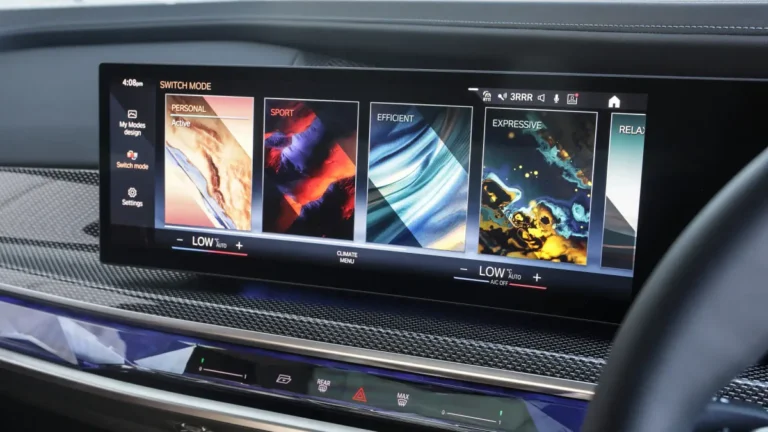
MBUX stands for Mercedes-Benz User Experience. It is Mercedes-Benz’s infotainment and vehicle-control platform, combining the central touchscreen, digital instrument display, steering-wheel controls and voice assistant. You can also read our guide on tesla door handles preventing ice over after a winter car wash.
Depending on the model, trim, software version and market, MBUX may provide access to:
- Navigation and media
- Bluetooth phone functions
- Climate controls
- Vehicle settings
- Driver-assistance settings
- User profiles
- Ambient lighting
- Connected services
- Voice commands
- Selected vehicle routines or favorites
The menus are not identical across the A-Class, C-Class, E-Class, S-Class, GLC, GLE, EQ models and commercial vehicles. A current vehicle may also receive software updates that change menu names or move functions to a different screen.
For model-specific behavior, start with the vehicle’s digital owner’s manual and the official Mercedes-Benz USA site. Do not assume that instructions for one Mercedes-Benz model apply to another. For more on this, see our guide on oklahoma antique car registration guide for 25 year.
Why a Car Wash Shortcut Is Useful
Preparing a vehicle for an automatic wash involves more than pressing “Start.” A conveyor wash, touchless bay or hand wash may each require slightly different settings.
A repeatable shortcut can help you remember to:
- Switch off automatic windshield wipers
- Close the windows and panoramic roof
- Fold the exterior mirrors when appropriate
- Remove or disable a roof-mounted accessory if required
- Confirm that doors, liftgates and charging flaps are closed
- Select the correct transmission position
- Follow the wash operator’s instructions for braking and conveyor movement
In practice, the most common mistake is leaving the wipers in automatic mode. Water or brush movement can trigger the wipers, potentially placing unnecessary force on the blades or arms. Another frequent error is entering a conveyor with the vehicle in Park when the wash requires Neutral. For more on this, see our guide on used car from ca arizona registration sales tax.
A shortcut reduces repeated touchscreen navigation, but it does not replace a final physical check.
Does Every Mercedes-Benz Have a Built-In Car Wash Mode?
No. Mercedes-Benz does not provide one universal car-wash function across every MBUX-equipped vehicle.
Whether you can create a true one-tap routine depends on:
- Model and model year
- MBUX generation
- Vehicle software version
- Country or market
- Optional equipment
- Whether the vehicle supports routines, favorites or programmable functions
- Whether the wash is automatic, touchless or manual
Some vehicles may offer a dedicated wash-related function. Others may let you save a frequently used screen, create a routine with selected comfort settings or place a vehicle function in a favorites bar. On some models, the available shortcut only opens a menu; it does not execute every action automatically.
Do not treat a generic internet guide as proof that your vehicle supports a feature. If “Car Wash,” “Routine,” “Automations” or a similar option is missing, use a saved checklist rather than attempting to force the function through unsupported settings.
What a Practical MBUX Car Wash Routine Can Do
Where supported, a routine may be useful for grouping settings that MBUX is actually allowed to control. Possible actions can include:
| Preparation item | Possible MBUX support | What you should verify |
|---|---|---|
| Close windows | Often available through vehicle controls | Confirm every window is fully closed |
| Close panoramic roof | May be available on equipped vehicles | Check the roof panel and sunshade |
| Fold mirrors | Model-dependent | Follow the wash’s mirror instructions |
| Open a vehicle-settings screen | Common as a shortcut or favorite | You may still need to change settings manually |
| Disable automatic wipers | Frequently requires manual control | Confirm the wiper stalk is not in AUTO |
| Select Neutral | Usually a driver action | Follow the conveyor operator’s instructions |
| Disable parking sensors | Not always available or advisable | Do not change safety settings unnecessarily |
| Lock the vehicle | Wash-dependent | Some washes require doors unlocked or the driver inside |
The safest design is a routine that handles only supported comfort functions and then displays a short reminder for actions that require the driver.
Actions MBUX Should Not Be Assumed to Perform
A generic “Car Wash” shortcut should not be described as automatically doing all of the following:
- Selecting Neutral
- Applying or releasing the parking brake
- Disabling every parking sensor
- Turning off all driver-assistance systems
- Preventing automatic braking
- Managing a vehicle on a conveyor
- Confirming that the vehicle is safe to enter the wash
These functions can depend on the vehicle’s operating state and safety logic. The driver remains responsible for following the wash facility’s instructions.
How to Look for a Car Wash Shortcut in MBUX
Menu names differ, but the following process is a useful starting point.
1. Park safely before configuring anything
Set the vehicle in Park, apply the parking brake if appropriate and keep the engine or vehicle system in the required state. Do not experiment with routines while approaching a moving wash conveyor.
2. Open the vehicle controls
From the MBUX home screen, look for areas labelled something similar to:
- Vehicle
- Settings
- Comfort
- Doors and windows
- Exterior lighting
- Assistance
- Favorites
- Routines
- Automations
- Quick access
The exact labels may differ by vehicle.
3. Check for an existing routine or favorite
Search for a preset related to washing, vehicle preparation or exterior settings. If a dedicated wash function is present, read the confirmation screen carefully before using it.
A built-in feature may change only a small number of settings. It may not select Neutral or control the wiper stalk.
4. Add supported actions only
If your MBUX system allows a custom routine, select only actions that appear as available options. For example:
- Close windows
- Close the sunroof
- Fold mirrors
- Open the relevant vehicle-control page
- Display a reminder or saved instruction
Do not add a setting merely because a generic guide recommends it. If the option is not shown in your vehicle, it is not part of that vehicle’s supported routine.
5. Name and place the routine clearly
Use a short name such as Car Wash Prep or Wash Preparation. Add it to the favorites area or home screen if MBUX allows this.
A clear name is better than a long command because another driver can understand it quickly.
6. Test it while parked
Run the routine at home or in a safe parking space. Confirm what actually changes:
- Did the windows close?
- Did the roof close?
- Did the mirrors fold?
- Did MBUX only open a menu?
- Did any warning or confirmation appear?
Test the routine again after a major software update or service visit. A routine can also behave differently when the vehicle is moving, charging or in a different drive mode.
The Manual Steps You Still Need to Complete
Even with a useful MBUX shortcut, perform this final check before entering a wash.
Exterior and openings
- Close every window.
- Close the panoramic roof and sunshade.
- Close the trunk, liftgate and doors.
- Confirm the charging flap is closed on an electric vehicle.
- Remove loose exterior accessories when the wash requires it.
- Check that the fuel door is closed.
Wipers and lights
- Move the windshield wiper control out of automatic mode if the vehicle’s instructions require it.
- Check that the rear wiper is not active.
- Follow the wash operator’s instructions for headlights and exterior lighting.
Mirrors and antennas
- Fold the mirrors only if the wash facility permits or requires it.
- Check whether a roof antenna, bicycle carrier, ski rack or other accessory must be removed.
- Do not force power-folding mirrors by hand unless the owner’s manual specifically permits it.
Transmission and conveyor procedure
- Follow the wash attendant’s instructions exactly.
- Select Neutral only when instructed and only when the vehicle’s procedure permits it.
- Keep your foot positioned as directed.
- Do not apply the parking brake if the conveyor requires the wheels to roll freely.
- Never leave the vehicle in a setting that conflicts with the wash operator’s directions.
The correct procedure can differ between a belt conveyor, rail conveyor and drive-through touchless bay.
Should You Disable Parking Sensors?
Usually, no. Parking sensors may issue repeated warnings when water, foam or brushes pass close to the bumpers, but that does not automatically mean they should be disabled.
Consider these points:
- Some models temporarily suppress warnings in specific wash conditions.
- Some wash facilities expect sensors to remain active.
- Disabling one assistance feature may not disable every sensor or camera.
- Driver-assistance settings can affect safety outside the wash, so remember to restore anything changed manually.
- Never disable a safety feature simply because a generic shortcut recommends it.
If the vehicle displays a wash-specific instruction, follow the owner’s manual. Otherwise, let the wash operator explain whether a setting needs to change.
One-Tap Preparation for Hand Washing
A shortcut is not only useful at an automatic wash. It can also create a consistent starting point for washing at home.
For hand washing, use MBUX to close openings and prepare the vehicle, then wash the exterior using a paint-safe process. A two-bucket setup with separate wash and rinse water can reduce the chance of dragging grit across the paint; this safer wash process explains the order and equipment in more detail.
Avoid spraying high-pressure water directly into:
- Door seals
- Window seals
- Charging connections
- Camera housings
- Grilles and active shutters
- Convertible-top seams
- Damaged paint or exposed trim
After washing, open the doors and liftgate briefly in a safe location to check for trapped water around seals. Dry cameras, sensors and door handles with a clean microfiber towel.
A Simple Car Wash Shortcut Template
If your MBUX system supports custom routines, use this as a planning template rather than a guaranteed list of available commands.
Routine name
Car Wash Prep
Supported automated actions
- Close the windows.
- Close the panoramic roof and sunshade.
- Fold the mirrors if required by the wash.
- Open the vehicle-control page or display a reminder.
Manual confirmation
- Set the wiper control correctly.
- Confirm the rear wiper is off.
- Check that all doors, windows and flaps are closed.
- Remove or secure external accessories.
- Follow the wash operator’s Neutral and braking instructions.
- Check the instrument display for warnings.
This hybrid approach is more dependable than claiming that one MBUX tap can control every mechanical and safety-related function.
Common Problems and Fixes
The routine option is missing
Your model may not support custom routines, or the function may be restricted by software version or market. Use the favorites bar, save the relevant vehicle-control screen or keep a short phone note for the manual checks.
The shortcut opens a menu but changes nothing
That is normal for some MBUX shortcuts. A favorite may be a navigation shortcut rather than an automation. Treat it as a fast route to the settings page.
The mirrors do not fold
Mirror folding may be disabled in the vehicle settings, unavailable on the trim or restricted while the vehicle is moving. Do not force the mirrors by hand unless Mercedes-Benz permits it for your model.
The vehicle will not select Neutral
Transmission control is often deliberately excluded from routines. Select Neutral manually when safe and when directed by the wash facility.
The wipers activate during washing
Before entering the wash, verify the stalk position and automatic-wiper setting. If the vehicle has rain-sensing wipers, do not rely on a touchscreen shortcut alone.
The car behaves differently after an update
Recheck the routine and repeat the test while parked. Software updates can alter menu locations, permissions and the way vehicle profiles store settings.
Is a Car Wash Shortcut Safe?
It can be, provided it is treated as a convenience feature rather than an autonomous wash-control system.
Use these precautions:
- Configure and test the routine while stationary.
- Follow the car wash’s posted instructions over a saved shortcut.
- Check the vehicle physically before the conveyor starts.
- Do not assume that a routine changed the transmission or parking brake.
- Restore any driver-assistance or sensor settings you changed manually.
- Stop if the vehicle displays an unexpected warning.
- Keep the owner’s manual available for model-specific instructions.
A shortcut should reduce button presses, not reduce driver attention.

Credit: www.mbscottsdale.com
Maintenance After the Wash
Once the wash is complete:
- Confirm the windows, roof and doors remain closed until the vehicle is dry enough to open safely.
- Check the mirrors have returned to their normal position.
- Wipe water from cameras and parking sensors.
- Inspect the wheels and lower body for remaining dirt.
- Check the wiper blades for streaking or lifted edges.
- Remove standing water from door handles and seals.
- Restore any settings changed for the wash.
If you wash at home, use clean drying towels and avoid allowing soap to dry on warm paint. For tires and other equipment, use the correct pressure and nozzle distance rather than relying on maximum compressor output; equipment guidance for tire work can help when setting up a garage system.

Credit: www.mbscottsdale.com
Frequently Asked Questions
Does Mercedes-Benz MBUX have a universal Car Wash Mode?
No. Availability varies by Mercedes-Benz model, year, equipment, software and market. Some vehicles may offer a wash-related function or routines, while others provide only individual settings and favorites.
Can MBUX automatically put the car in Neutral?
You should not assume that it can. Selecting Neutral is commonly a manual driver action governed by the vehicle’s transmission and the wash facility’s procedure.
Can a shortcut turn off the windshield wipers?
Some vehicles may provide a relevant setting, but the safest practice is to verify the physical wiper control before entering the wash. Do not rely on the shortcut without checking the instrument display or stalk position.
Should I fold the mirrors before an automatic wash?
Follow the wash operator’s instructions and your vehicle’s manual. Some facilities require mirrors folded; others may be designed for mirrors to remain extended. Never force power-folding mirrors manually unless approved for your model.
Can I use a voice command such as “Prepare car for wash”?
Only if your vehicle recognizes that command or you have configured a supported routine. MBUX voice behavior varies, so test the phrase while parked. If it fails, use the touchscreen shortcut or manual checklist.
What should I do if my MBUX does not support custom routines?
Save the relevant vehicle-settings page as a favorite if possible, then use the manual checklist: close openings, check the wipers, confirm the doors and flaps, handle the mirrors and follow the Neutral instructions.
Does the shortcut protect the car from all wash damage?
No. It can help with preparation, but it cannot prevent unsuitable brushes, incorrect conveyor procedures, high-pressure spray damage or problems caused by aftermarket accessories. Choose an appropriate wash and inspect the vehicle afterward.
Conclusion
A Mercedes-Benz MBUX car wash shortcut can make preparation faster and more consistent, but the exact capability depends on the vehicle. Some Mercedes-Benz models support routines or favorites; others require manual changes.
The best setup combines supported MBUX actions—such as closing openings or opening the correct vehicle menu—with a short physical checklist for wipers, mirrors, accessories, transmission position and wash instructions. Test the routine while parked, verify what it actually changes and never assume that one tap controls safety-critical functions.
Set up and test your “Car Wash Prep” favorite before your next wash, then use the final checklist every time.