Black Friday deals are live on Amazon · limited-time discounts, grab them before they’re gone
Grab the deals

ByMax Lee
Tesla Software Update: Did the Latest Version Change Your Car Wash Mode? Shocking!
A Tesla software update can change menus, timing, alerts, or the way a feature behaves. That does not necessarily mean Tesla has redesigned Car Wash Mode itself.
The important distinction is between a documented feature change and a change you notice because your Tesla received a different software build, model-specific configuration, or bug fix. Tesla releases updates in stages, so two vehicles with the same model may not receive identical changes at the same time. You can also read our guide on how to exit car wash mode when the screen freezes in tesla model.
This guide explains what Car Wash Mode does, what a recent update may affect, how to verify your vehicle’s version, and how to use the setting safely in 2026.
Has the Latest Tesla Update Changed Car Wash Mode?
There is no single “latest Tesla update” that behaves identically on every vehicle. Tesla software is distributed by vehicle model, hardware configuration, region, and rollout group. Release notes may also describe general improvements without listing every small interface or reliability adjustment. You can also read our guide on genesis gv80 how to protect the fingerprint scanner during interior detailing.
In practice, owners may notice:
- The Car Wash Mode button appearing in a slightly different menu.
- A prompt asking the driver to confirm the vehicle is ready.
- Different timing when windows, the charge port, or wipers are disabled.
- A warning when the vehicle is not in the required gear.
- Car Wash Mode turning off after the vehicle is shifted out of Neutral.
- Small changes to touchscreen wording or confirmation messages.
These observations do not prove that the core protections have been removed. The safest approach is to check your Tesla’s current version and test the mode while parked before entering a wash.
Tesla’s official vehicle guidance remains the best source for model-specific instructions because menu names and available functions can vary by vehicle and software build. You can also read our guide on tesla wheel covers should you remove aero caps before an automatic wash.
What Is Tesla Car Wash Mode?
Car Wash Mode is a preparation setting designed to reduce the chance that normal vehicle functions interfere with washing. It is not a physical shield, and it does not guarantee protection from every automatic wash system.
Depending on the Tesla model and software version, activating the mode may:
- Close the windows.
- Close the sunroof or panoramic roof where applicable.
- Lock the charge port.
- Disable windshield wipers.
- Disable certain audible alerts.
- Turn off or restrict some automatic vehicle functions.
- Prevent doors, locks, or other controls from responding unexpectedly.
- Help prepare the vehicle for a conveyor-style wash by keeping it in the appropriate state.
The exact list can differ. Tesla has changed Car Wash Mode over time, and not every model supports identical controls. Read the confirmation screen rather than assuming your car will perform every action listed above. You can also read our guide on bmw i4 car wash mode step by step guide to sensor safety.
Car Wash Mode is not the same as a wash-safe vehicle state
A common mistake is to activate the mode and immediately assume the car is ready for a conveyor. The driver still needs to:
- Remove the charging cable.
- Close all doors, windows, and the trunk.
- Fold mirrors if the wash requires it.
- Confirm the vehicle is in the gear requested by the wash operator.
- Follow the car wash’s instructions for Neutral, brake release, or conveyor positioning.
- Remain attentive until the vehicle is correctly positioned.
Car Wash Mode helps manage the vehicle’s electronic settings. It cannot correct a poorly positioned vehicle or make an unsuitable wash safe.
How to Turn On Car Wash Mode
The menu path can vary slightly between Tesla models and software releases, but the usual process is:
- Park the Tesla before entering the wash lane.
- Remove any charging connector.
- Close the doors, windows, trunk, and frunk.
- Open the touchscreen controls.
- Select Controls.
- Open Service.
- Tap Car Wash Mode.
- Review the on-screen checklist or warning.
- Confirm the vehicle is ready.
- Follow the wash operator’s instructions about Neutral and brake use.
Do not rely on the Tesla mobile app to provide the same controls as the vehicle touchscreen. The in-car display is the authoritative interface for preparing the vehicle. You can also read our guide on tesla door handles preventing ice over after a winter car wash.
If Car Wash Mode is unavailable, confirm that the car is fully stopped and not connected to a charger. Some controls may also be unavailable while a door, trunk, or other vehicle condition requires attention.
What Car Wash Mode May Change After an Update
A software update can alter the sequence, wording, or reliability of the preparation process without adding a dramatic new feature. These are the changes most likely to be noticed.
Menu location and labels
Tesla periodically reorganizes touchscreen menus. A setting that was previously easy to find may move under Service, or its label may receive a small wording change.
If you cannot find it, use the vehicle’s touchscreen search function where available, or look through Controls > Service while the vehicle is parked.
Confirmation behavior
Newer software may ask you to confirm conditions such as:
- The vehicle is not charging.
- Windows and openings are closed.
- The vehicle is stopped.
- You understand the requirements for a conveyor wash.
- The car is ready to enter Neutral or remain stationary.
This extra confirmation is not necessarily a malfunction. It may be intended to reduce driver error.
Timing and status feedback
Some owners interpret a short delay as a failure because the charge-port indicator, window status, or touchscreen message does not change immediately. Software updates can change how quickly status information appears.
Wait for the on-screen confirmation before entering the wash. If the mode does not confirm, do not assume it activated.
Vehicle-specific differences
A Model 3, Model Y, Model S, or Model X may not display exactly the same options. Hardware differences, including roof design, door mechanisms, sensors, and model-year equipment, affect what the software can control.
For that reason, a table claiming that every Tesla received the same Car Wash Mode upgrade would be misleading.
How to Check Whether Your Tesla Received a Relevant Update
To identify whether an update may explain a change:
- Park the car safely.
- Open Controls.
- Tap Software.
- Record the displayed software version.
- Note the installation date and any release-note summary.
- Compare the behavior with the instructions shown on your touchscreen.
- Check for another pending update before contacting Tesla.
Avoid comparing only the first few numbers of a version. Tesla builds can include additional identifiers, and two vehicles may receive different releases with similar-looking version labels.
A feature that appears different may also result from:
- A vehicle reboot after installation.
- Temporary connectivity or display lag.
- A change in vehicle settings.
- A door, trunk, window, or charge-port condition.
- A wash operator placing the vehicle in a different state.
- A software bug that affects only one model or hardware configuration.
Safe Automatic-Wash Procedure
Before entering an automatic wash, use this checklist:
- Remove the charging cable.
- Remove loose items from the roof, trunk, and exterior.
- Close every window and door.
- Confirm the charge port is closed and locked.
- Turn on Car Wash Mode.
- Check the touchscreen for confirmation.
- Disable accessories that could interfere with the wash.
- Follow the operator’s instructions for Neutral and the brake pedal.
- Keep the key card or phone key available in case staff need to move the vehicle.
- Do not leave the car unattended if the wash requires driver control.
Touchless washes generally reduce the risk of brush contact but may use high-pressure water. Brush or conveyor washes can create more risk for paint, trim, wheel covers, mirrors, cameras, and door handles. Car Wash Mode does not eliminate those mechanical risks.
For hand washing, a paint-safe washing method can reduce the chance of dragging grit across the paint. Rinse the vehicle thoroughly before touching the finish, and use clean microfiber materials rather than household towels.
Why Tire and Wheel Checks Still Matter
Software preparation is only one part of a safe wash. After leaving the wash, inspect the tires and wheels, especially if the vehicle travelled through a conveyor system or over a track.
Look for:
- A visibly low tire.
- A missing valve-cap cover.
- A damaged wheel-cover edge.
- Debris caught around the wheel.
- Unusual vibration during the first drive.
- Water trapped around charging equipment or door seals.
If you need to restore pressure, use a reliable gauge and follow the pressure shown on the vehicle’s tire-information label, not the maximum pressure molded into the tire sidewall. A suitable compressed-air setup can help with routine checks, but an air compressor is not a substitute for inspecting a damaged tire.
What to Do If Car Wash Mode Does Not Work
If the setting fails to activate or the vehicle behaves unexpectedly, stop before entering the wash.
If the option is missing
Check that:
- The vehicle is parked.
- No charging cable is connected.
- All doors and openings are closed.
- The touchscreen has finished loading.
- The vehicle is running the expected software version.
- You are looking under the current Service menu.
A touchscreen restart may resolve a temporary display issue, but do not restart the system while the car is in a moving conveyor.
If the windows or roof remain open
Do not enter the wash. Close them manually and confirm that the seals are fully seated. If a window will not close, contact Tesla Service before exposing the interior to water.
If the charge port does not lock
Do not force the charge-port door. Confirm the cable is disconnected, close the port if necessary, and try the mode again while parked. A charge-port problem should be addressed before using a wash that sprays water around the rear of the vehicle.
If the car will not remain in the required state
Ask the wash operator to stop the conveyor or guide you out safely. Do not fight the vehicle’s controls or press the accelerator to compensate for an unexpected state. Document the software version and the exact behavior, then report it through Tesla’s service process.
Does an Update Disable Autopilot or Automatic Braking?
Car Wash Mode is intended to prevent normal driving-assistance or vehicle-control behavior from interfering with the wash. However, it should not be described as a universal replacement for driver attention or as a guarantee that every automated function is disabled in every situation.
The vehicle’s on-screen instructions take priority. Confirm the displayed status, follow the wash operator’s directions, and keep control of the vehicle whenever the procedure requires it.
Never test the mode by moving the car into a wash bay without staff guidance. A software setting cannot protect against incorrect gear selection, a stuck accelerator, an open door, or contact with brushes and rails.
Why Your Tesla May Look Unchanged After an Update
Most updates do not modify every feature. Tesla may install a release that improves connectivity, navigation, charging, cameras, or background system performance while leaving the Car Wash Mode interface unchanged.
It is also normal for:
- An update to arrive later on another vehicle.
- Release notes to omit minor user-interface changes.
- A feature to behave differently because of model hardware.
- A change to appear only after a reboot.
- A staged rollout to pause or resume.
- A bug fix to affect reliability without changing the menu.
Therefore, “my Car Wash Mode looks the same” does not mean the update failed. Conversely, a different screen does not necessarily mean the vehicle received a major redesign.

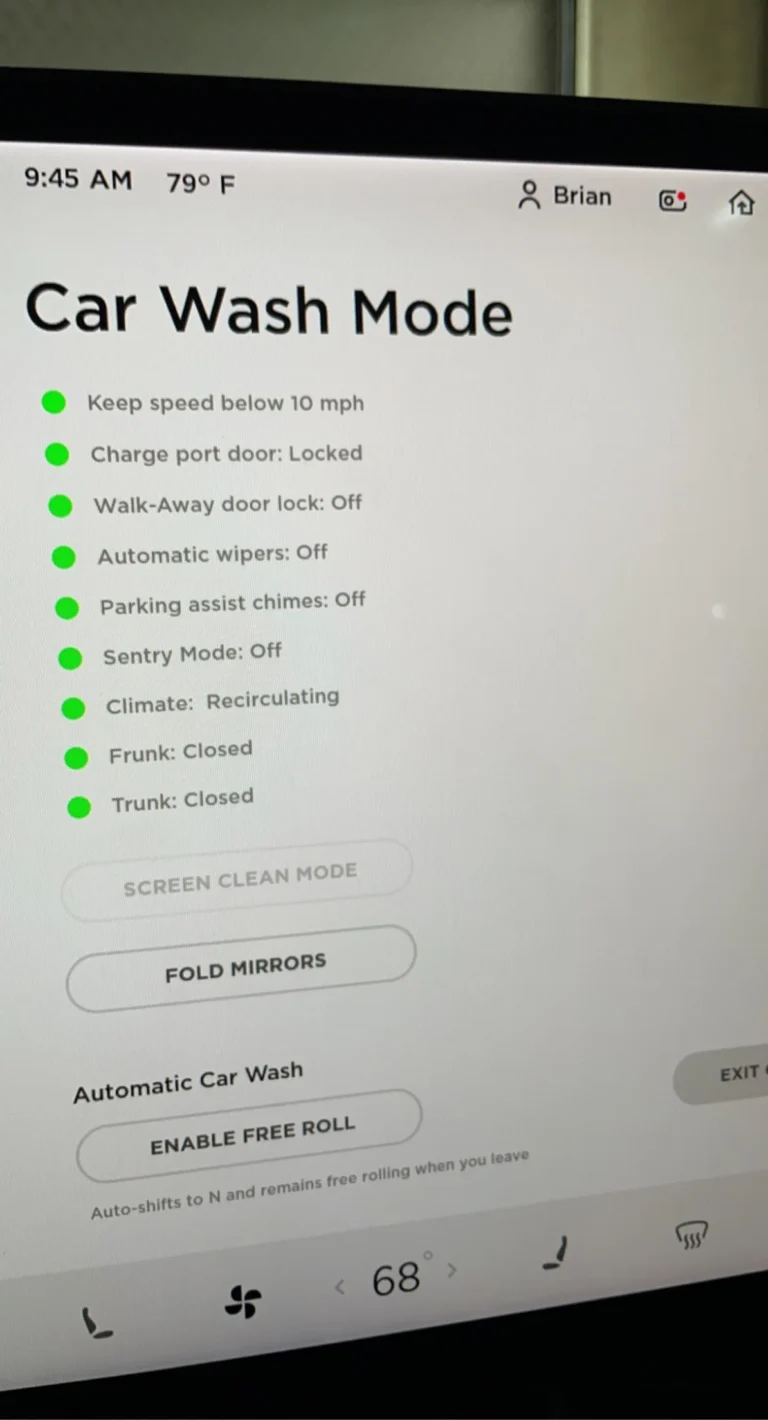
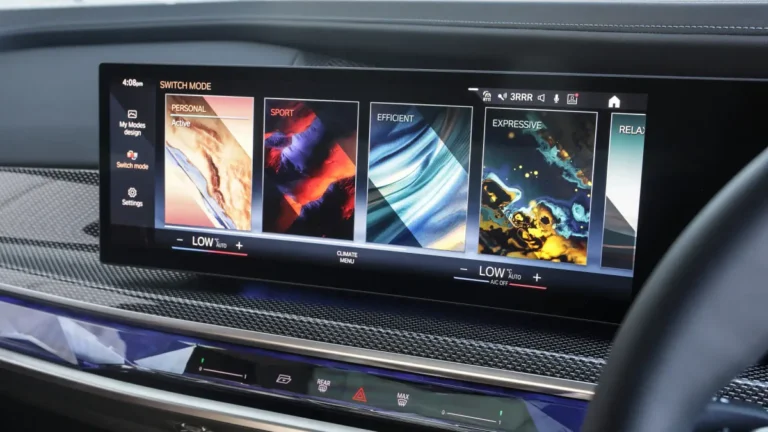
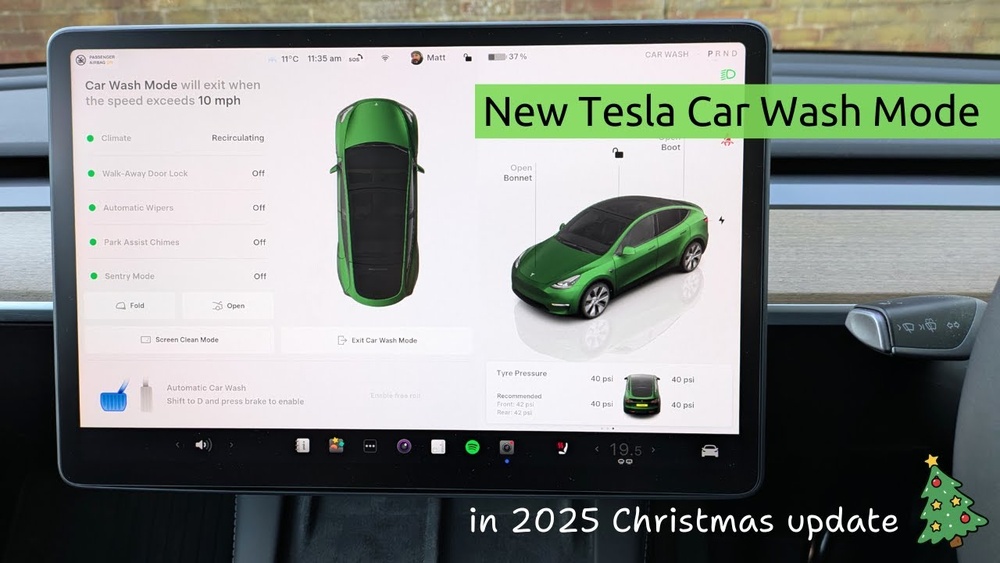
The touchscreen is where drivers confirm wash-preparation settings before entering the bay.
Credit: www.youtube.com
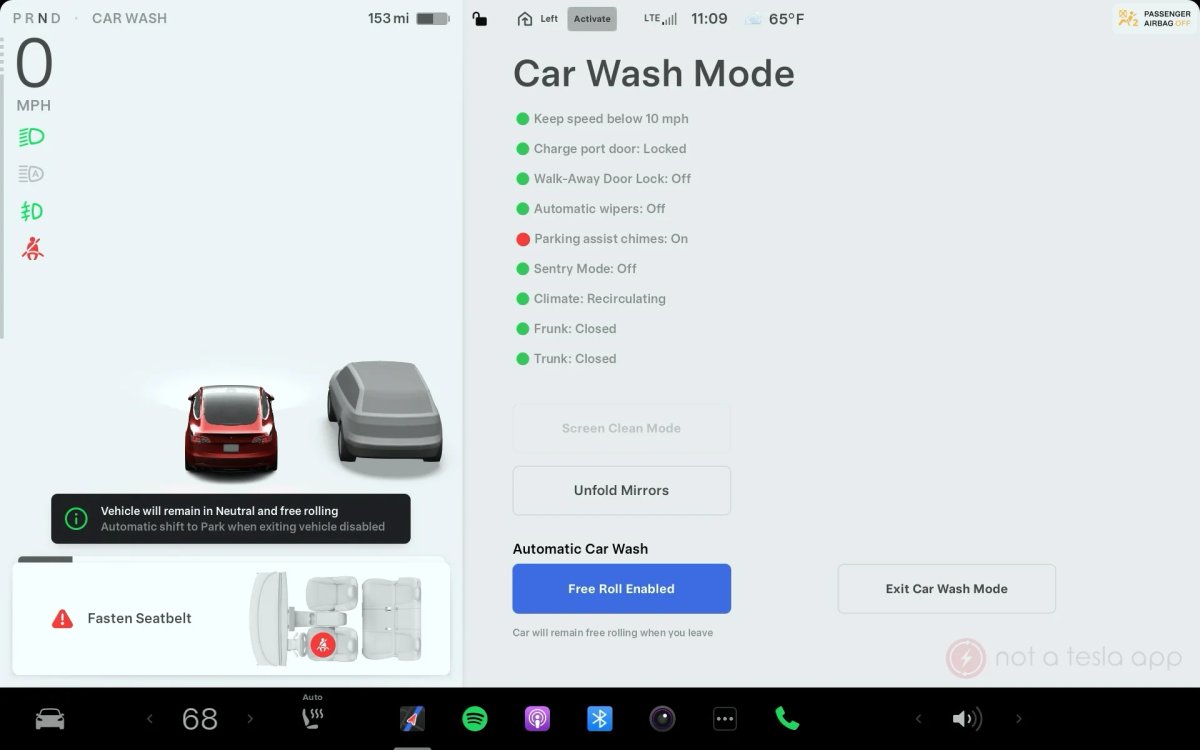
The menu may look different depending on the model and software build.
Credit: www.notateslaapp.com
Frequently Asked Questions
Did the latest Tesla software update definitely change Car Wash Mode?
Not for every Tesla. Software updates are distributed by model, hardware, region, and rollout stage. Some owners may see menu or timing changes while others see no visible difference. Check the software version and the instructions displayed by your own vehicle.
Does Car Wash Mode close the windows automatically?
It is designed to prepare relevant openings, but the exact behavior depends on the model and software version. Always verify that the windows and roof are closed before entering the wash.
Can I use Car Wash Mode while the Tesla is charging?
No. Disconnect the charging cable first. Never drive away with a connector attached, and do not expose an open charging connection to wash spray.
Should I use a brush car wash with a Tesla?
A Tesla can be washed in different ways, but brush and conveyor systems create physical risks that software cannot remove. Touchless or careful hand washing may reduce contact with paint, trim, wheels, mirrors, and sensors. Follow the wash operator’s instructions and inspect the vehicle afterward.
What if Car Wash Mode is missing from my menu?
Park the vehicle, disconnect charging equipment, close all openings, and look under Controls > Service. If it remains unavailable, check the software version and contact Tesla Service rather than entering the wash without confirmation.
Does Car Wash Mode protect the cameras and sensors?
It helps prevent certain vehicle functions from interfering with washing, but it does not shield cameras and sensors from high-pressure water, brushes, chemicals, ice, dirt, or physical impact. Inspect and clean them after the wash if alerts appear.
Does the mobile app activate Car Wash Mode?
The in-car touchscreen is the dependable place to activate and verify the feature. App controls can vary by software version and may not provide the same preparation checklist or confirmation.
Bottom Line
A Tesla software update may change how Car Wash Mode is displayed, confirmed, or timed, but there is no universal evidence that every Tesla received the same major change. Differences between vehicles are expected because updates and hardware configurations vary.
Before washing, disconnect charging equipment, close every opening, activate Car Wash Mode from the touchscreen, read the confirmation message, and follow the wash operator’s instructions. If the vehicle does not confirm that it is ready, do not enter the wash.
Check your exact software version and on-screen guidance before relying on any feature behavior—especially after an update.